
Debugging
To properly debug a segfault we need to use a build with libtorrent and qBittorrent debug symbols included.
Some reasons I don’t release them here:
- static builds using
b2the libtorrent debug symbols can add 100MB to the file size. - static builds using
cmakeare about 15MB larger and potentially slower. - It doubles the build time.
- It’s not needed for most users.
The easiest way to get a debug build is to build it yourself by
-
forking the repo the repo and running the
ci-main-reusable-caller.ymlworkflow with the debug flag enabled.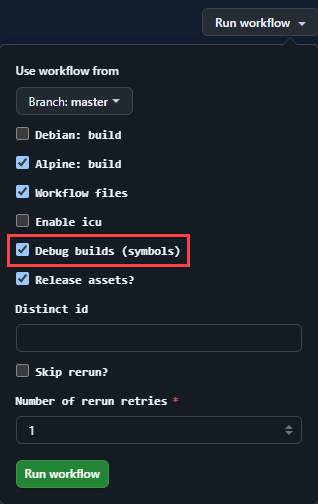
-
Build it yourself locally
This can be done one of two ways with the recommended method being the second, for general purpose debugging.
-
First, Full debug mode binary.
All apps have debug mode set to true where applicable.
This can be done when building locally by using the
-dflag orexport qbt_build_debug=yes -
Second, Release binary with debug symbols
By not stripping the binary, this allows you to have a binary with release binary with debug symbols.
This sets the below flags which does not optimise any debug sections but apps are not set to debug mode.
# defaults if both are set to noqbt_strip_qmake='-nostrip'qbt_strip_flags=''qbt_optimise_gcc="-Og -g" # https://gcc.gnu.org/onlinedocs/gcc/Optimize-Options.html#index-Ogqbt_optimise_linker="-Wl,-O0"This can be activated by using these flags:
export qbt_build_debug=no # a default optionexport qbt_optimise_strip=no # When not stripped the Binary is optimised with -Ogexport qbt_use_lto=no # Native Alpine host only setting. LTO is not used in cross builds
-
A custom version of qbt-mcm can be set using these flags:
# testing = easy way to switch to test qbt-musl-cross-make-test builds via an env in the workflow.qbt_mcm_url="userdocs/qbt-musl-cross-make" # the default setting# provide the github tag and it will use that to download instead of the latest release.export qbt_mcm_tag="2614"Then you will have a debug build with the debug symbols included to get stack traces using gdb.